

Export SVG, PNG, ICO, and ICNS in One Pass
By Axialis Team
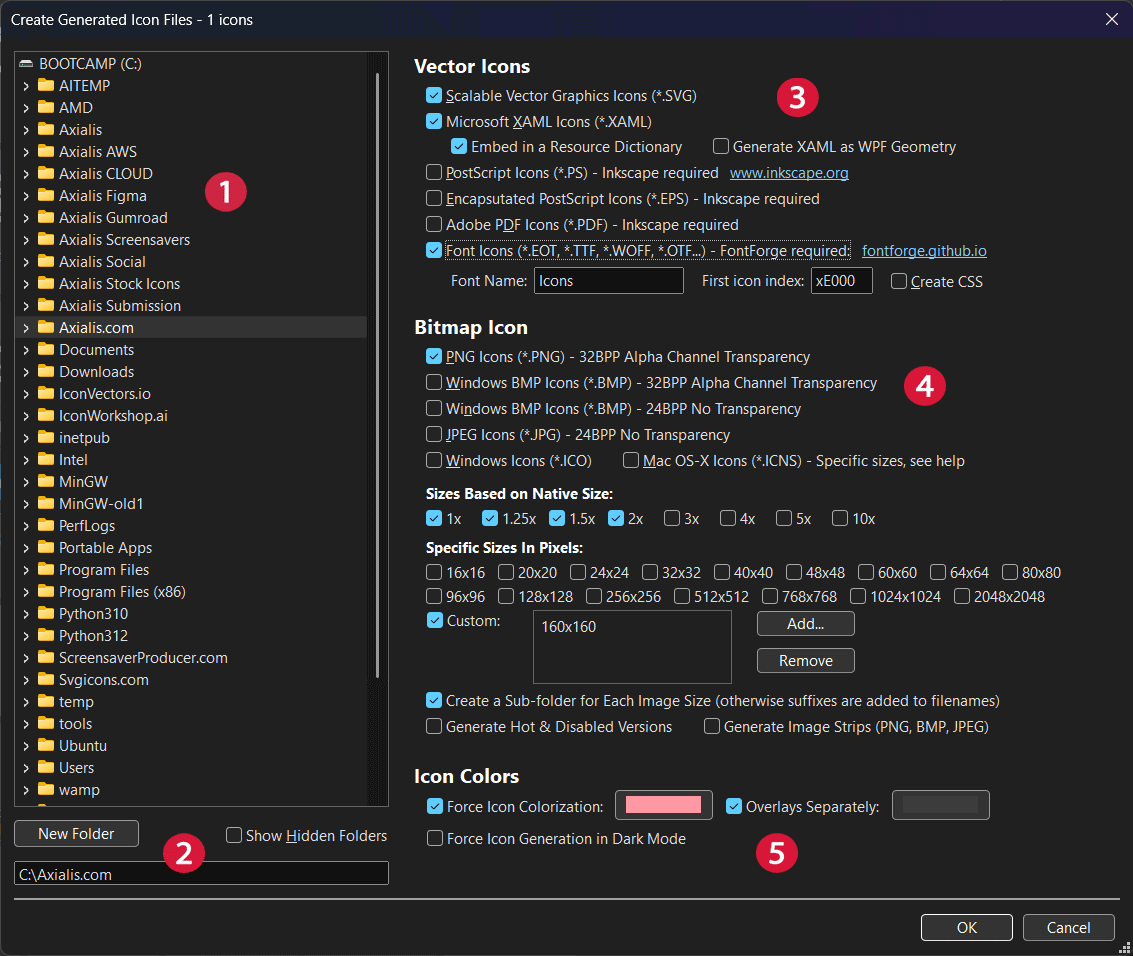
The export dialog lets you generate multiple output families at once. This avoids repeating the same job for each format.
Step 1 - Open export dialog
- From current generated selection: File -> Create Generated Icon Files (F3).
- From a collection: Collection -> Create Collection Icon Files (F4).
Step 2 - Choose destination and structure
- Select output folder in the tree.
- Create a dedicated folder if needed.
- For bitmap sizes, choose subfolders-per-size or filename suffix mode.
Step 3 - Select vector formats
- Enable SVG and XAML for scalable assets.
- Enable PDF/EPS/PS if you need print/document compatibility (requires Inkscape).
Step 4 - Select bitmap and platform formats
- Enable PNG for general UI usage.
- Add ICO for Windows app icons and ICNS for macOS icon containers.
- Choose size scales (1x, 2x, 3x) or fixed pixel sizes.
Step 5 - Optional generation variants
- Generate hot/disabled variants for stateful desktop toolbars.
- Create image strips for image-list style UI frameworks.
- Force icon colorization, separate overlay colors, or dark mode generation.
Validation checklist
- At least one output format selected
- Bitmap formats paired with at least one selected size
- Dependencies installed for optional formats (Inkscape, FontForge)